Registering/UnRegistering Your Legacy Apex Licenses
Learn how to register and unregister an Apex license so you can use it on another PC.
Document 4821 | Last updated: 12/29/2016 MJY
If you just need to register/free an Apex license because you've purchased a new PC or are reorganizing the PC's in your office continue on to the steps below. If not, it's possible that you're experiencing one of the following problems that result from an improperly registered copy of legacy Apex software. Some users experience other difficulties that can be resolved by registering/freeing Apex licenses as well. These other problems include:
- Sketches are labeled with "Evaluation Copy"
- Apex won't open when you launch it in WinTOTAL or prompts you to register when you try to create a sketch
In some cases, WinTOTAL may also need to be registered to resolve this problem. In those scenarios you may also experience the following:
- Reports are labeled with "Demo Version Only"
- You're experiencing difficulties downloading maps, updates, etc in WinTOTAL
- WinTOTAL is registered to customer number 8888888888 or another customer number other than yours.
If you believe that both Apex and WinTOTAL are not properly registered, you can verify that by clicking Help, About from the menus while in a report. If the customer number listed is 8888888888 or is incorrect, you'll need to register WinTOTAL before you can register Apex properly.
On November 1st, 2006 Apex took over the sales and support of their sketching software. As a result, a la mode is no longer able to provide technical support for any Apex issues not directly related to integration with our products. Please contact Apex at 800‑858‑9958 for assistance with all other issues.
Keep in mind that Legacy Apex (Apex IV v2 and Apex IV v3) was not designed to run on 64‑bit OSes or Windows 7, Apex v4 Medina or higher will be needed.
Alternatively, you can use TOTAL Sketch, our free sketching product that's included with TOTAL and WinTOTAL. Visit our TOTAL Sketch website to learn more: http://help.alamode.com/appraiser/TOTALSketch/
- If you just need to register your legacy Apex license, follow the steps below.
- If you need to register both WinTOTAL and Apex, complete the steps in Tech Doc 5053 and then complete the steps outlined below.
- If you've installed a fresh copy of Aurora on your computer and would like to install your legacy Apex software, first run through the steps in Tech Doc 5116.
Registering Your Legacy Apex License Online through WinTOTAL
This is the fastest and preferred way of instantly registering your legacy Apex license.
- Open a report, and go to the Sketch PowerView. Then, click Sketching options under Sketch Areas on the left.
- Choose the option "Apex Version 3.0" (a la mode custom version) and click Register.
- Select the option for Internet Registration, and then click Next.
- Enter information such as your first and last name and your computer description, then click Finish.
- The Registration Wizard will go online and send your information. (If you receive an error, try again in a few minutes before doing the manual option ‑ it may just be Internet traffic).
Registering Your Legacy Apex License Manually through WinTOTAL
Only use this option if you don’t have an Internet connection or the online method failed. This method will not give you instant access to Apex.
- Open a report, and go to the Sketch PowerView. Then, click Sketching options under Sketch Areas on the left.
- Select the option for Manual Registration, and then click Next.
- Enter information such as your first and last name and your computer description, then click Print.
- Fax the printed information to a la mode at 1‑800‑211‑4512. You should receive your registration code via call or fax from a la mode within three (3) hours when received between 8:00 a.m. and 5:00 p.m. CST. During this time, you may close out of the registration screen and continue working while waiting for your code.
- Once you have received the code, follow steps 1and 2 above to get to the Apex registration screen. Then, click Register and enter the registration code you received.
- Click OK, and your PC will be registered to use Apex.
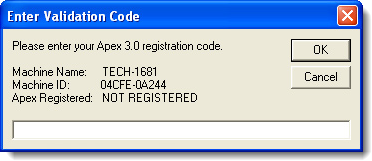
If you are registering manually, you must enter the validation code sent to you by a la mode to complete your registration.
UnRegistering Your Legacy Apex Licenses through WinTOTAL
If the PC with your legacy Apex license is still up and running, open a report, and go to the Sketch PowerView. Then, click Sketching options under Sketch Areas on the left.
- If you're online, select the Internet option, and then click OK. Within seconds, the license will be free, and you can use it on another PC.
- If you don’t have an Internet connection on that PC, select the Manual option, and then click OK. Apex will be unregistered on that PC. You’ll need to print the un‑registration information according to the instructions that appear on screen. Then, fax this document to us so we can enter it manually and keep your record up to date.
If you not longer have access to your old computer to unregister Apex or you run into an issue while managing your licenses inside Aurora please call a la mode Tech Support for assistance.


